D3: Documentation Driven Development
“If a feature is not documented, it doesn’t exist. If a feature is documented incorrectly, then it’s broken.”
Most teams write specs the way they write tests for legacy code: after the fact, to make a tool happy. The real design decisions happen in Slack threads, in a Figma comment, in someone’s head during a stand-up. By the time anything is written down, the code already exists and the document is just a description of what was built — not a plan for what to build.
“Spec before code” is not a new idea. README-Driven Development (RDD — coined by Tom Preston-Werner in 2010) and documentation-first workflows have been around for well over a decade, and they always ran into the same wall: writing a complete, accurate spec by hand is expensive and boring, so teams skipped it. The discipline was right; the economics were wrong.
What changed is that an LLM agent will now do most of that expensive work — read the codebase, find the gaps, interview the team, draft the spec, and then build from it. Documentation Driven Development (D3) is that old discipline made cheap: the team produces a complete specification before writing code, with AI woven into every phase — not just the coding at the end. This post walks through the full flow on a feature we actually shipped this way.
If you’ve read my earlier post on Documentation in the AI Era, think of D3 as the process counterpart to that idea: if docs are the new source code, then D3 is the development lifecycle built around them.
The Problem We’re Solving
You already know the symptoms: specs scattered across Slack, Figma, and people’s memory; QA pulled in only after the code is written; AI reached for during coding but never during planning. I won’t belabor them.
The one point worth keeping is the economics. A wrong assumption caught in a spec costs a sentence; caught in code review it costs a branch; caught in production it costs an incident. The fix gets dramatically more expensive the longer the misunderstanding survives — so the highest-leverage move is to push the hard thinking as early as possible. The reason teams didn’t was that early, thorough specs used to be too costly to produce. D3’s bet is that AI has changed that math.
What is D3?
D3 is a process where the team builds a complete specification of a feature before writing code. What that buys each side:
| For Management | For Developers |
|---|---|
| Predictable delivery — scope is locked before coding | You receive a Final SRS before touching code |
| Fewer rework cycles — QA plans tests upfront | Claude has full context and generates plans and code from the spec |
| Clear handoff points between Product, Engineering, QA | A plan-review loop catches design issues before implementation |
| AI amplifies output at every phase, not just coding | No more “what did Product actually mean here?” |
The key shift is that the specification is not paperwork produced alongside the work — it is the work, until the moment code generation begins.
The End-to-End Flow
Every arrow below is a checkpoint, and feedback can loop back at any stage.
1 | Product (idea → PRD → prototype) |
Let’s walk through the phases.
Phase 1 — Idea & Initiation
Owner: Product. This phase is unchanged from how most teams already work. Product takes a business need, user request, or strategic goal and turns it into an idea → PRD → prototype. A lightweight PRD and/or prototype is enough; it feeds directly into requirements collection. What changes in D3 is everything that comes after this phase.
Phase 2 — Collecting Requirements
Owner: Analyst/Technical Project Manager. Time: ~20 minutes, AI-assisted.
This is where AI first earns its keep. The process is three steps:
- Consolidate sources into one
.mdfile — PRD, designs, existing docs, API contracts. - Claude finds the gaps — it checks the docs against the existing codebase, surfaces unknowns, and lists open questions.
- Claude interviews the team — it asks targeted questions to fill those gaps, then produces a clean draft.
The important detail: Claude is not guessing from the PRD alone. With code/docs exploration and the Figma MCP, it reads the actual codebase to validate requirements against what is already implemented. It knows which modules exist, which patterns to reuse, and where the new feature plugs in.
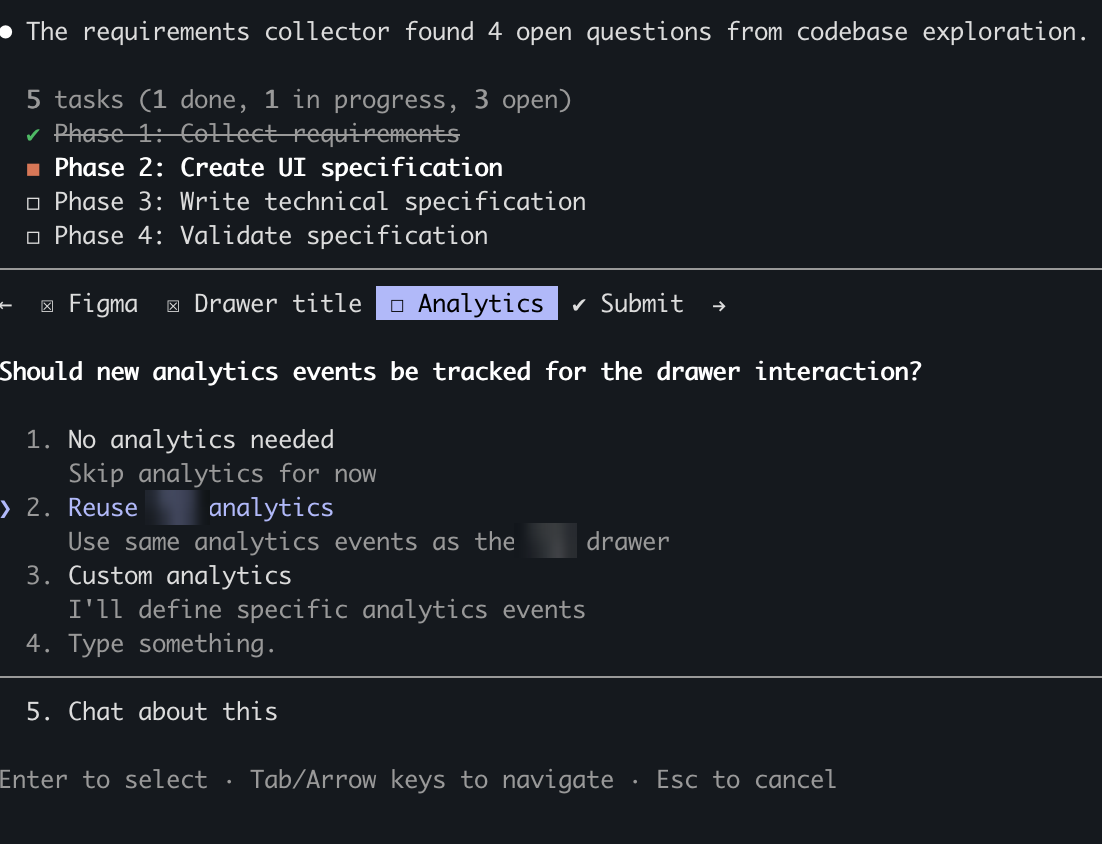
In the screenshot above the requirements collector found four open questions from codebase exploration, and rather than inventing answers it asks the team — for example, whether the new drawer should reuse the existing analytics events or define custom ones.
Phase 3 — Review & Final SRS Sign-off
Owner: Analyst/Technical Project Manager + QA + stakeholders.
The draft SRS from Phase 2 is reviewed collectively until everyone signs off. The output is a single Final SRS — one source of truth, approved by all stakeholders. The moment it’s approved, two things happen at once:
- QA writes the test plan straight from the Final SRS. Testing is designed before implementation begins, so bugs are caught in the spec, not in the code.
- Development can start in parallel. The Final SRS is enough to begin; the detailed per-domain specs (next phase) don’t block the kickoff.
A good Final SRS contains:
- Feature requirements and acceptance criteria
- Edge cases and error handling
- API contracts and data flows
- Fallback chains and dependencies
What the Final SRS Looks Like
Abstract process descriptions are easy to nod along to, so here is a concrete one (sanitized into a generic feature). Say we’re adding a partner drawer behind a promo banner.
In module
feature-promo-banners, implement a drawer with a list of partners from the API. Reuse the drawer implementation fromfeature-item-details. The drawer opens only via deep link.
Fallback chain:
- Primary: Run the promo action (the main partner flow)
- Fallback 1: Open the Quick Access Drawer
- Fallback 2: Navigate to the “All Partners” screen
Acceptance criteria:
- If the primary promo API fails (hardcoded config used), keep showing the skeleton and call the Drawer API.
- If the Drawer API succeeds → show the banner; tapping it opens the Quick Access Drawer.
- If the Drawer API also fails → show the banner; tapping it navigates to
/partners.
This is the level of detail the team agrees on before the LLM generates any implementation spec or code. There is no ambiguity left for the developer — or the model — to guess at.
Phase 4 — AI-Generated Implementation Specs (SRS × 3)
Owner: Developer + Claude.
The Final SRS says what to build; it doesn’t yet spell out how. That’s the next step, and it’s where the LLM takes over. With a plan-feature skill — plus code/docs exploration and the Figma MCP — Claude expands the Final SRS into three detailed, domain-specific implementation specs:
| Document | Owner | Focus |
|---|---|---|
| UI Specification | Frontend / Design | Screens, components, user flows, design tokens |
| Server Specification | Backend | APIs, data models, business logic, error codes |
| Client Specification | Android / iOS | Platform integration, deep links, native behavior |
These are far more detailed than the Final SRS: they reference real files and modules, follow existing codebase patterns, and include concrete implementation examples rather than describing the feature in a vacuum. In practice the agent reads the Final SRS, spawns sub-agents to dig through the codebase, and writes each spec by mirroring code that already exists in the repo.
It runs as a loop:
| Step | What happens |
|---|---|
| AI generates | Claude writes the detailed implementation specs from the Final SRS |
| AI reviews | Claude reviews its own specs for correctness and completeness |
| Dev reviews | The developer validates, adjusts, and approves before any code is written |
The loop runs until the developer is satisfied — and only then does coding begin. Design issues get caught here, on cheap text artifacts, instead of in a PR review after the code is already written.
Phase 5 — AI-Assisted Coding Loop
Owner: Developer + Claude.
| Step | What happens |
|---|---|
| AI implements | Claude writes code based on the approved specs + Final SRS |
| AI reviews | Claude reviews the generated code for issues and edge cases |
| Dev reviews | The developer reviews, requests changes, or approves |
Because the specs and plan were already settled, this loop is mostly mechanical. The drawer feature above came together in well under an hour of wall time and roughly 3,000 lines of code — all matching a spec the whole team had already agreed on.
Phase 6 — QA, Documentation & Release
Owner: QA.
- QA executes the test plan it created back in Phase 3.
- Visual QA (VQA) validates the UI against the Final UI Specification.
- Any issues loop back to the Dev Review stage.
- Claude analyzes which docs need updating after implementation.
- On pass → PROD deployment.
That documentation step matters more than it looks. After the feature ships, Claude runs a documentation impact analysis: it scans which SRS files, API docs, and analytics specs drifted, classifies each as a major/minor/no-change update, and proposes the exact edits — so the docs that started the process stay correct for the next one.
After release, real-world feedback flows back to Product, closing the loop.
What Actually Changes
Stripped to the essentials, D3 moves three things earlier in time:
- The spec stops being a write-up of what was built and becomes the input that drives the build. The discussion’s output is the spec.
- QA stops testing after the fact and starts writing the test plan from the draft SRS — so test design happens before, not after, implementation.
- AI stops being a coding assistant at the end and becomes a participant at every phase: it gathers requirements, drafts specs, plans, implements, reviews, and flags doc drift.
Everything else — predictable scope, fewer re-scoping conversations, cheaper reviews — falls out of those three shifts. The net effect is less rework and features that ship closer to what was actually intended.
A Note on Tooling
I describe this with Claude and a specific set of skills because that’s what we used, but D3 is model-agnostic. Nothing in the process depends on a particular vendor — it needs an LLM agent that can read your codebase, search the web, follow a multi-step prompt, and ideally call tools (a code/docs explorer, a design integration). Any capable model fits: Claude, GPT, Gemini, or a local model behind an agent runtime like Cursor, Aider, or your own scripts.
What matters is the capabilities, not the brand: codebase awareness so specs reference real modules, a long enough context window to hold the consolidated requirements, and tool access so the agent validates against reality instead of hallucinating. Swap the model; the seven phases stay the same. Quality and speed will vary by model, so treat the numbers above as one data point, not a benchmark.
Getting Started
- Pilot on the next new feature — run D3 end-to-end as a trial.
- Set up the skills —
plan-feature,implement-feature, and a PR-review skill. - Configure the tools — code/docs exploration and the Figma MCP.
- Establish SRS templates — a consistent structure for the UI / Server / Client specs.
- Review the pilot — collect feedback, measure the time saved, and refine the process.
D3 is not a rigid framework — it’s a discipline. The goal is simple: by the time anyone writes code, everyone already knows exactly what we’re building.